Test Page
Brief overview of the app's purpose and its significance in material testing.
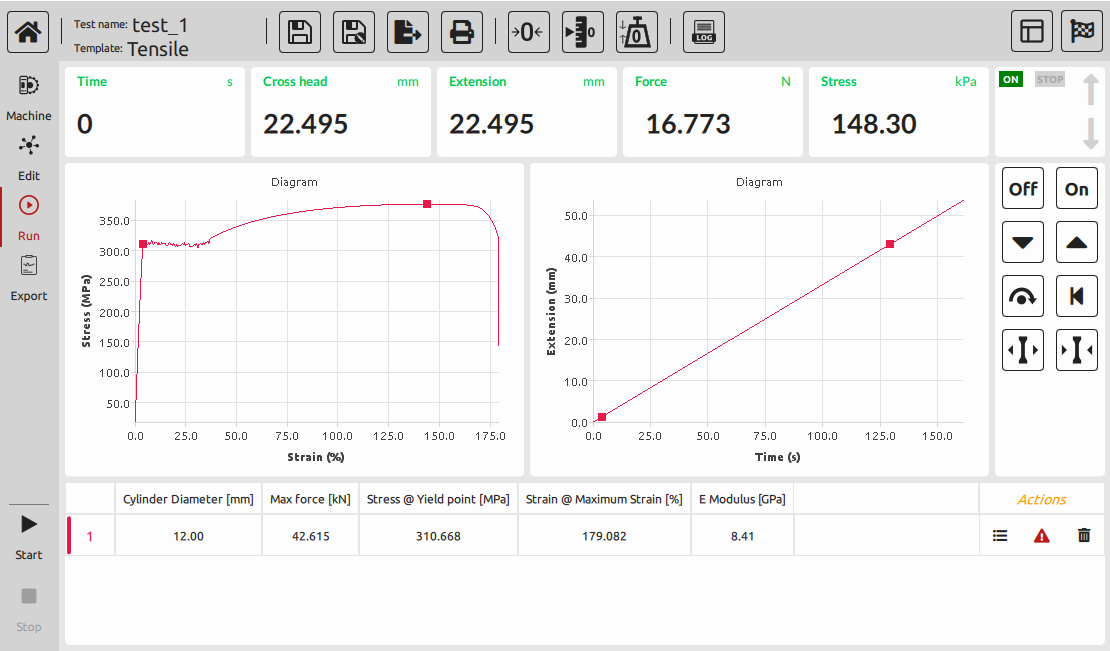
User Interface
Top Menu Bar
Explanation of the options and functionalities available in the top menu bar.

-
Save: Allows users to save the current test configuration or data for future access.
-
Save As: Enables saving test data under a new name or file, creating multiple versions of the same test.
-
Export: Facilitates exporting test data or results in various formats (e.g., CSV, Excel, PDF) for external analysis.
-
Print: Enables printing of test configurations, graphs, or results for physical records or reports.
-
Zero Crosshead: Establishes the reference point for the crosshead, ensuring accurate measurements.
-
Zero Extension: Sets the reference point for extension measurements, ensuring accurate elongation readings.
-
Zero Force: Sets the baseline force measurement to zero, ensuring accuracy during material testing.
-
Log: Records and maintains a log of test activities, providing a chronological history of tests conducted, changes made, and other relevant information.
These functionalities ensure precision and accuracy in measurements, essential for reliable test results.
Left Menu Bar
- Machine: Describing the machine-related functionalities.
- Edit: Detailing options related to editing tests or parameters.
- Run: Explaining the running and execution functionalities.
- Export: Detailing the export options and capabilities.
- Start/Stop Buttons: Functionality and usage instructions for initiating and halting tests.
Central Panel
- Live Display: Description of real-time data visualization during tests.
- Chart Panel: Explanation of the graphical representation of test results.
- Result Bar: Displaying immediate or summarized results.
Handset Bar (Right Panel)
Explanation of the handset located on the right-hand side of the interface.